Mindslip
Get the beta

A Mac notepad that listens

For everything that slips your mind.

A notepad in your menu bar. One note and one to-do list a day — and it can record your calls.

Get the beta

Free while in beta · macOS 26 or later · Apple silicon

  • On-device
  • No account
  • Works offline

Meetings Pro

Record the call. Get the summary.

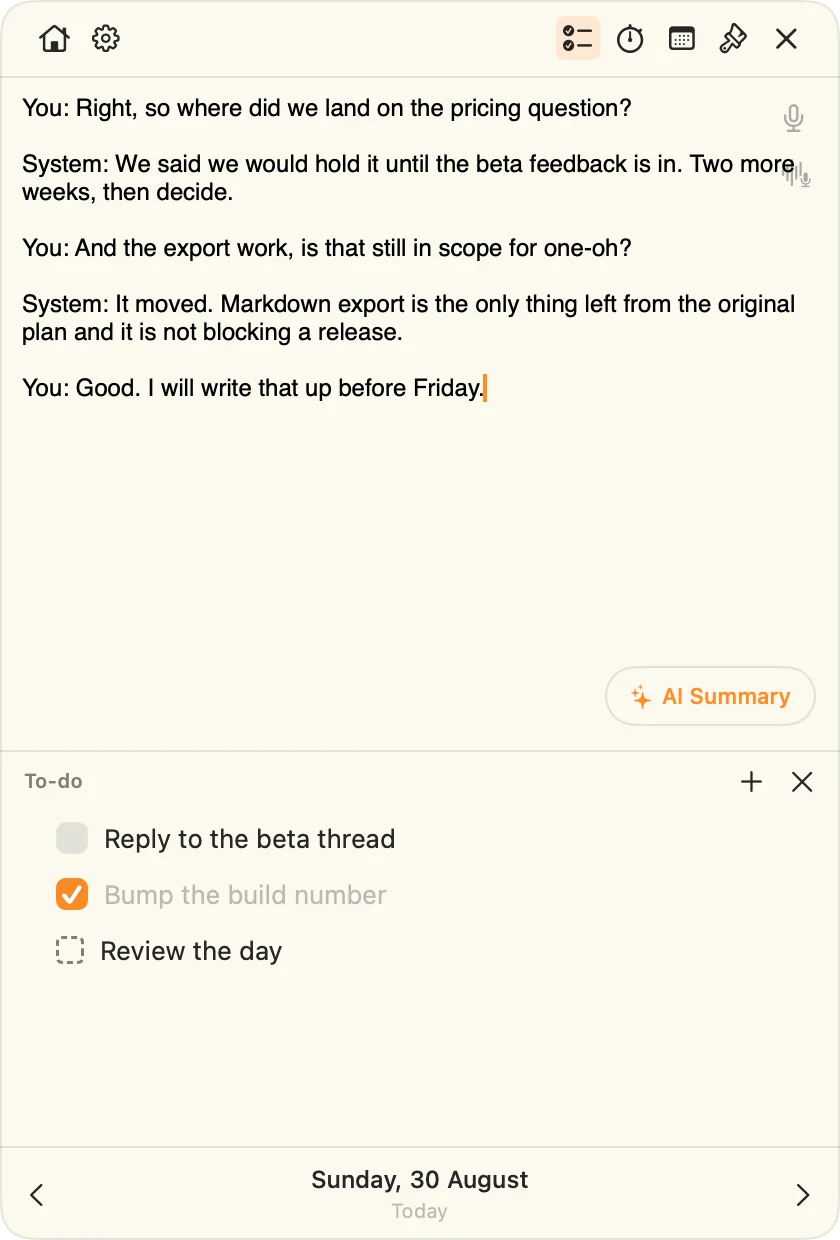
Your mic and your Mac's audio are transcribed separately, so every line is marked You or System.

You:System:

A meeting transcript in Mindslip, each line marked You or System.
The transcript
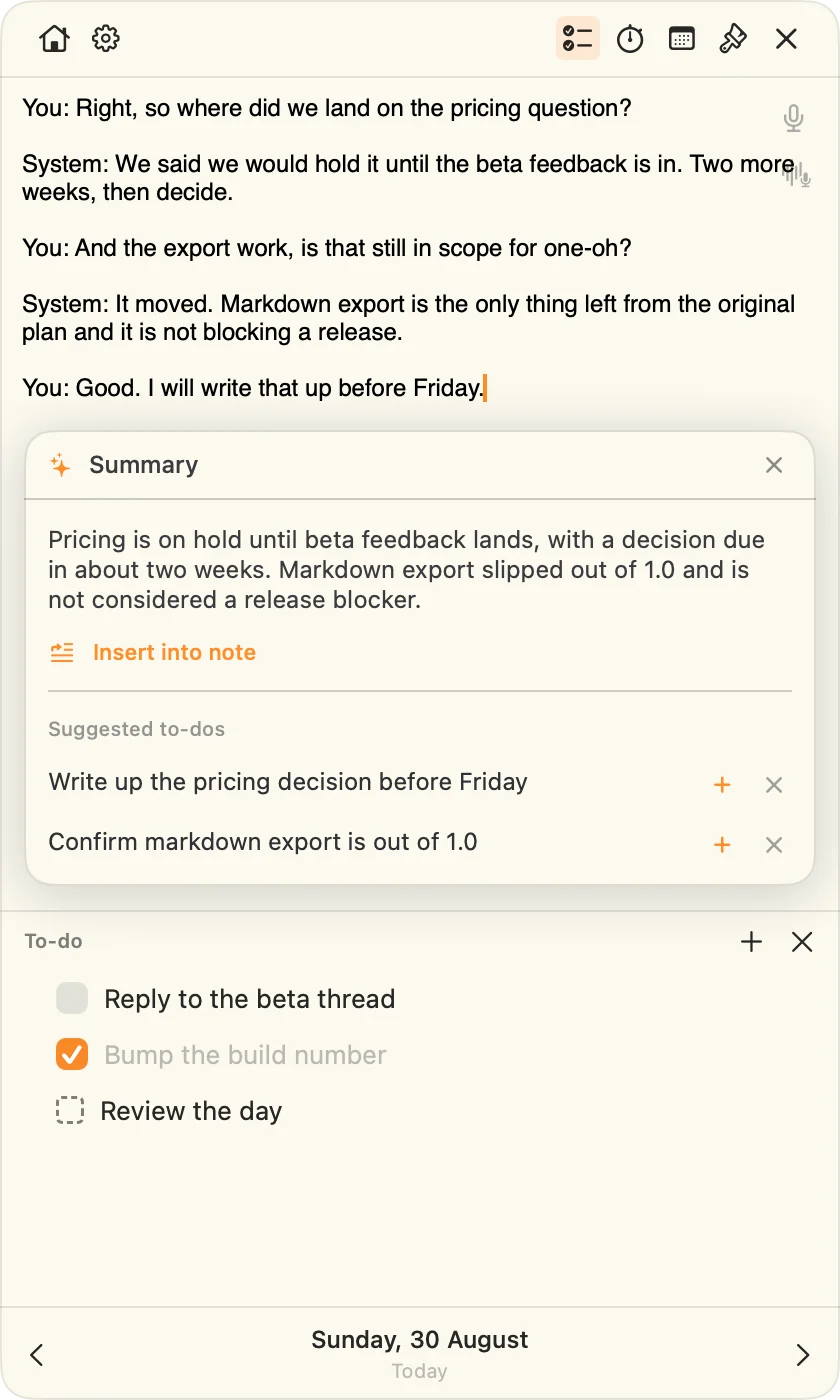
The AI summary card: a short summary of the call and suggested to-dos, each with add and discard buttons.
The summary
  • Any app that plays soundIt listens to your Mac, so nothing joins your call.
  • A summary and up to five to-dosMade by Apple Intelligence, on your Mac.
  • Keep the to-dos you wantTap + to add one. Discard the rest.

Privacy

Your Mac. Your iCloud. Nobody else's servers.

Transcripts and summaries are made on your Mac. There's no account and no Mindslip server.

  • No accountNothing to sign up for.
  • On-deviceSpeech and summaries stay on the Mac.
  • Sync is optionalOff by default. On, it uses your own iCloud.

Read the privacy note →

Sync runs through your private iCloud database. Click to replay.

See it work

Two minutes with Mindslip.

Try it on your next call.

Get the beta

The notepad

Every button, explained.

It floats above every app, Space and screen. Here's what everything does.

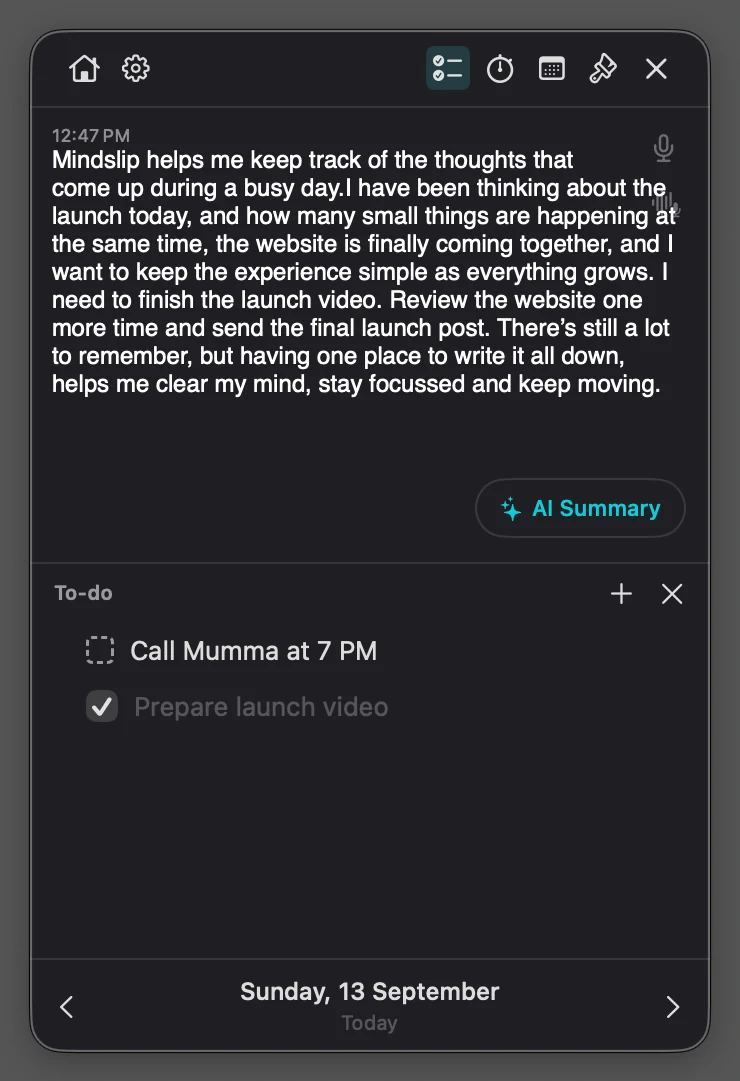
The Mindslip notepad in the Dark theme: a note with a 12:47 PM time stamp, the AI Summary button, a repeating to-do and a finished one.
  • SettingsFonts, time stamps, reminders
  • Home ⌘0Every day, starred and searchable
  • Time stampWhen you started writing
  • Repeats every dayThe dashed box comes back daily
  • Previous day ⌘[Yesterday's note and to-dos
  • Today ⌘TBack to today from any day
  • To-do listOne checklist for the day
  • StopwatchStart, pause, reset
  • CalendarJump to any day
  • ThemeFive looks
  • MicDictate, on your Mac
  • Mic + System ProRecord the call
  • AI Summary ProA summary and to-dos
  • Add a to-doOne click adds a row
  • Next day ⌘]Plan tomorrow

Your day

One note. One list. Every day.

No folders or titles. Today opens on its own, and any other day is one click away.

Move what's left to tomorrow.

This board runs the app's own rules. Open a row's ⋯ menu and try it.

Move to tomorrow
Unfinished rows only. They land on tomorrow's list.
Repeat every day
A dashed box, and a fresh copy each day.
Stop repeating
Ends it from that day on. Past days keep theirs.
Drag to reorder
Put the list in the order you'll do it.

Every entry gets its time.

A new block after a 15-minute gap. 12- or 24-hour.

12:47 PMThoughts from a busy launch day. 1:05 PMSend the final launch post.

A nudge before the day ends.

Only on days with to-dos left. You pick the time.

Today's events, above the note.

Read from your calendar. Jump to any day.

Standup
1:1 with Priya
Design review

Search every day at once.

Notes and to-dos. Star the days worth keeping.

launch
Sunday, 13 September…finish the launch video…
Friday, 11 Septemberlaunch checklist…

Export to PDF.

One day or every day, with or without to-dos.

Contents
Note & to-dosNote only
Days
This day onlyAll days

Made for the Mac

Always one click away.

It lives in the menu bar, keeps up with long calls, and looks the way you like.

Lives in your menu bar.

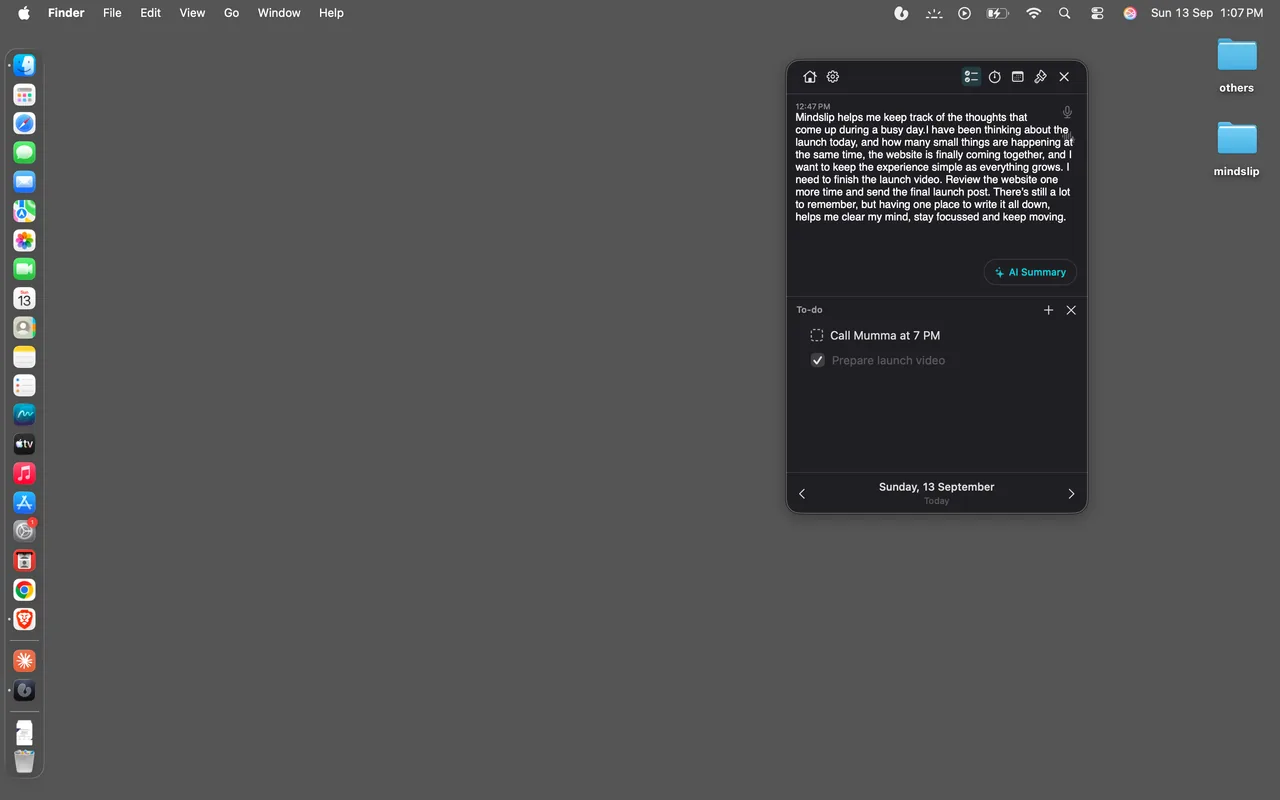
Click the droplet. The notepad floats above every app, Space and screen.

A Mac desktop with the Mindslip droplet in the menu bar and the notepad open beneath it.
The menu bar, magnified, with the Mindslip droplet circled.

Folds to a mini bar.

Click the top bar. The stopwatch comes with it.

The notepad folded into a single bar with a stopwatch.

Say it. It's written down.

On your Mac. Words appear as you speak, or when you stop.

Seven fonts. Any size.

11 to 28 point. The system font is free; six more come with Pro.

Aa
System
Aa
Georgia
Aa
Menlo
Aa
Avenir Next
Aa
American Typewriter
Aa
Snell Roundhand
Aa
Chalkboard SE

Five themes. The whole app follows.

Pick one — the mocks on this page switch with it.

Ready when you are.

Opens at login, and at wake if you want.

Launch at login
Show the panel at wake

Spell check and autocorrect.

The Mac's own, as you type.

Send the final launh post. launch

Built for long calls.

  • Keeps recording when folded
  • Stops and saves before sleep
  • Recovers if headphones unplug
  • Stops after 5 quiet minutes

Pricing

Free notepad. Pro for the call.

The notepad is free for good. Pro adds call recording, AI summaries and six more fonts.

Free

$0

  • Floating notepad in the menu bar
  • A note and a to-do list every day
  • Time stamps on every entry
  • Move to tomorrow, repeat every day
  • End-of-day review
  • Mic dictation, on your Mac
  • Search every day
  • Calendar events
  • Mini bar and stopwatch
  • PDF export
  • Five themes
  • iCloud sync

Pro · Yearly

14 days free

$39.99/ year

Everything in Free, plus:

  • Record calls — You and System
  • AI summaries
  • Suggested to-dos
  • Six more fonts
  • Every Pro feature that ships later

14 days free, then $39.99 a year. Cancel any time.

Pro · Lifetime

Pay once

$99.99once

Everything in Pro, plus:

  • One payment, no renewal
  • Every future update

No server to pay for — that's why a lifetime price works.

Free while in beta. Pro is bought inside the app; prices in USD, and the App Store shows yours.

Compare every feature
FeatureFreePro · YearlyPro · Lifetime
Notepad
Floating notepad in the menu barIncludedIncludedIncluded
A note and a to-do list every dayIncludedIncludedIncluded
Time stampsIncludedIncludedIncluded
Mini bar and stopwatchIncludedIncludedIncluded
Calendar eventsIncludedIncludedIncluded
Spell check and autocorrectIncludedIncludedIncluded
To-dos
Move to tomorrowIncludedIncludedIncluded
Repeat every dayIncludedIncludedIncluded
End-of-day reviewIncludedIncludedIncluded
Voice and AI
Mic dictationIncludedIncludedIncluded
Record calls — You and SystemNot includedIncludedIncluded
AI summariesNot includedIncludedIncluded
Suggested to-dosNot includedIncludedIncluded
Look
Five themesIncludedIncludedIncluded
Font size, 11–28 ptIncludedIncludedIncluded
Six more fontsNot includedIncludedIncluded
Your notes
Search every dayIncludedIncludedIncluded
PDF exportIncludedIncludedIncluded
iCloud syncIncludedIncludedIncluded
Price$0$39.99 / year$99.99 once
What happens after the trial?
The yearly plan starts at $39.99. Cancel before day 14 and nothing is charged.
Where do I cancel?
System Settings → Apple Account → Subscriptions.
Bought it before?
Settings → Mindslip Pro → Restore purchases. Codes are redeemed there too.

Questions

Before you ask.

Does it tell people on a call apart?

It separates you from the call. Your mic is labelled You; everyone else is labelled System.

Which apps does call recording work with?

Any app that plays sound on your Mac. Nothing joins your call.

Do I need headphones?

No, but they give the cleanest transcript. On speakers, your mic also hears the call.

What if I forget to stop recording?

It stops by itself after 5 minutes with nothing to transcribe.

Should I tell people I'm recording?

Yes. Consent rules vary by place, and a call is other people's words too.

Does it work offline?

Yes. Writing, dictation and summaries run on your Mac. Sync catches up when you're back online.

Where do my notes live?

On your Mac. With iCloud sync on, also in your own private iCloud database — not ours.

What do I need?

macOS 26 or later on Apple silicon (M1 and later). Summaries need Apple Intelligence turned on.

How do I check permissions?

Settings → Manage permissions. "Test system audio" checks recording in under a second.

Is there an iPhone app?

Not today. Mindslip is a Mac app.

Mindslip

Your day, written down.

Free while in beta · macOS 26 or later · Apple silicon

Get the beta